How to Find a Village in Minecraft: Biomes, Maps and /locate
Find a village in Minecraft fast: travel the biomes that hold them, scan from high ground, use a seed map or cartographer map, or run /locate with cheats.

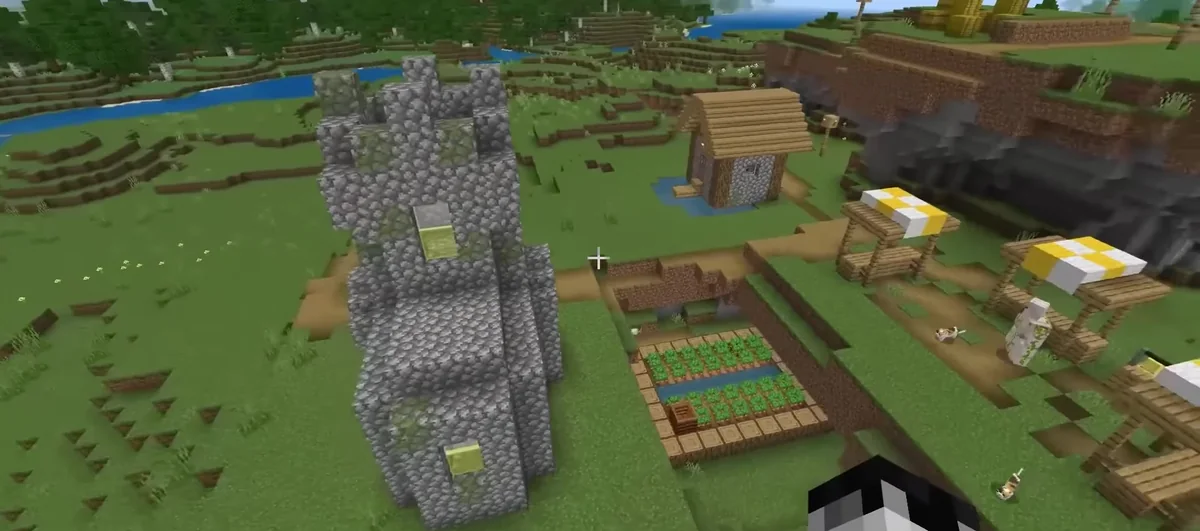
The fastest way to find a village in Minecraft without cheats is to travel through the biomes that can hold one (plains, meadow, desert, savanna, taiga and snowy plains) and scan from high ground for paths, farms and bells. With cheats on, type /locate structure #minecraft:village on Java or /locate structure village on Bedrock and the game prints the nearest village’s coordinates.
The biome list, spacing math and map trades below come straight from Java Edition 26.3’s game data, checked in October 2026. Bedrock (26.60, October 27, 2026) uses the same five village styles but its own placement rules. It also spawns villages in snowy taiga and sunflower plains and places them closer together, so treat the distance numbers as Java-only. Java 26.4 is in snapshots, so recheck once it releases.
Key takeaways
Which biomes do villages spawn in?
Villages only generate where the biome allows one. In Java 26.3’s world-generation tags, each of the five village styles is tied to specific biomes, and that list is shorter than many guides claim.
| Village style | Biomes (Java 26.3 data) | Main building material |
|---|---|---|
| Plains | Plains, Meadow | Oak wood and cobblestone |
| Desert | Desert | Sandstone |
| Savanna | Savanna | Acacia wood |
| Taiga | Taiga | Spruce wood |
| Snowy | Snowy Plains | Snow blocks and spruce |
Two details catch people out. Meadow villages use the plains style, so you can find oak houses up in the mountains. And Sunflower Plains, Snowy Taiga and Savanna Plateau aren’t on Java’s list, even though they sit right next to village biomes. If you’re not sure which biome you’re standing in, our guide to Minecraft biomes helps you tell them apart. On Java, the F3 debug screen also names the biome under your feet.
How far apart are villages in Minecraft?
Java’s village placement data uses a spacing of 34 chunks and a separation of 8. In practice, the world is cut into 34 x 34-chunk regions (544 x 544 blocks), and each region gets exactly one village attempt at a random spot within its first 26 chunks on each axis. The attempt only becomes a village if the biome there allows it.
Two neighboring Java village regions along one axis, using the spacing (34) and separation (8) values in 26.3’s data.
Here’s the math. The attempt lands at chunk 0 to 25 inside its region, so two neighbors sit 34 + (b – a) chunks apart, anywhere from 9 to 59 chunks. That’s 144 to 944 blocks, averaging 544. At the sprinting speed the Minecraft Wiki lists (about 5.6 blocks per second), 544 blocks takes roughly 97 seconds, and 944 blocks about 2 minutes 48 seconds.
Our take: if you’ve sprinted about 1,000 blocks in a straight line through village biomes and seen nothing, turn 90 degrees. You’ve crossed at least one full region on that axis, and its attempt may have landed in a forest or ocean.
How to find a village in Minecraft without cheats
Villages are surface structures, so you’re looking across terrain, not underground. These habits find them faster:
- Get up high. Pillar up a few blocks or climb a hill, then turn slowly. A spyglass helps you confirm a distant shape before you walk to it.
- Look for straight lines. Dirt paths, crop rows and rooftops stand out from natural terrain long before you can see villagers.
- Use the night. Village lamp posts and lanterns show up as dots of light across dark ground.
- Stay in village biomes. If the grass turns to jungle, dark forest or ocean, head back. None of those biomes can host a village.
- Follow open ground. Plains, deserts and savannas are flat and fast to cross, and they’re village biomes, so you cover ground and odds at once.
Write down the coordinates the moment you arrive (F3 on Java, or turn on Show Coordinates in Bedrock’s world settings). Finding a village twice is the annoying part.
How to use /locate to find a village
With cheats on, one command does the work. Java’s #minecraft:village tag covers all five village styles.
- Java, any village:
/locate structure #minecraft:village - Java, one style:
/locate structure minecraft:village_desert(swap in plains, savanna, snowy or taiga) - Bedrock:
/locate structure village
On Java, the coordinates in chat are clickable and drop a teleport command into your chat box. In a single-player Java world without cheats, Open to LAN with Allow Commands switched on enables them until you quit. On Bedrock, turning cheats on permanently disables achievements for that world, so make a copy first if you care about them.
In Creative mode, the fastest route is /locate, then fly to the coordinates or click them on Java to /tp straight there.
Find a village with your seed
Every world’s villages are fixed by its seed. Run /seed on Java, or read the seed from your world settings on Bedrock, then enter it into a seed map tool. Match the edition and the exact version (Java 26.3 or Bedrock 26.60), because a map set to the wrong one shows villages that aren’t in your world.
Buy a village map from a cartographer (Java 26.3)
Once you’ve found one village, a cartographer can point you to the next. In Java 26.3’s trade data, apprentice (level 2) cartographers draw from a pool that includes village maps priced at 8 emeralds plus a compass, with up to 12 uses. Each cartographer’s type decides which villages it can map, and it never offers its own style. A new cartographer starts at novice, so sell it paper for emeralds to push it up to apprentice.
| Cartographer’s type | Village maps it can offer |
|---|---|
| Plains | Savanna, Taiga |
| Desert | Plains, Savanna |
| Savanna | Plains, Desert |
| Taiga | Plains, Snowy |
| Snow | Plains, Taiga |
| Jungle | Desert, Savanna |
| Swamp | Snowy, Taiga |
Apprentices get only two trades from their pool, so a given cartographer may not roll a map at all. Mojang’s 26.3 release notes also made explorer maps their own items, each with its own icon. Bedrock has had village maps in normal play since 1.21.70, but its trade tables are separate, so check your cartographer’s offers before counting on the exact biome mix above.
What are zombie villages?
Some villages spawn abandoned: no living villagers, cobwebs, and zombie villagers wandering around. Java 26.3’s village center pools give the zombie version about a 2% weight for every style (for example, 4 of 204 in plains and 2 of 100 in taiga). The Minecraft Wiki’s village page lists every building variant if you want the full catalog.
A zombie village still counts as a find. Its beds, workstations and paths are all there, and once you cure or bring in villagers, it fills back up. If you’d rather rebuild the houses than patch them, pull ideas from our Minecraft house designs and keep the bell where it is.
Village FAQ
Can villages spawn in the Nether or the End?
No. Every biome on Java 26.3’s village list is an Overworld biome, so the Nether and the End never generate villages. Villagers can still survive in those dimensions if you move them there, but nothing spawns naturally. Your best bet stays the six Overworld biomes in the table above.
Is there a village in every Minecraft world?
Not near spawn, necessarily. Per the Minecraft Wiki, there’s about a 1 in 2 chance of a village within 500 blocks of spawn on Java and about 2 in 3 on Bedrock. Every normal world has them somewhere in its village biomes, and Java superflat worlds can generate villages too.
How do I get back to a village I found?
Write down the coordinates as soon as you arrive, then sleep in one of the village beds. That sets your respawn point there, so a death sends you back to the village instead of world spawn. On Java, F3 shows coordinates; on Bedrock, switch on Show Coordinates in world settings.
Why is there no village near my spawn?
Your spawn may sit in a biome that can’t host one, such as forest, jungle or ocean, and nearby attempts may have landed there too. Head toward open plains, desert or savanna. If you know your seed, a seed map tool set to the right edition and version can show exact village spots.

Ava Sinclair
Lead Analyst, ChessAva builds GameQuants' engine-evaluation and rating-system models and leads data-quality review across the desk.
More from Gaming
How to Install Minecraft Mods on Java and Bedrock (2026)
Install Minecraft mods on Java with Fabric or NeoForge: match your version, drop .jar files in the mods folder, play…

How to Tame a Ghast in Minecraft: Raise and Ride a Happy Ghast
Regular ghasts can't be tamed. Raise a Happy Ghast instead: hydrate a Dried Ghast in water, grow the ghastling, then…
How to Get Shaders in Minecraft: Java (Iris) and Bedrock
Get shaders in Minecraft Java with Iris and Sodium on Fabric or NeoForge and a shader pack in shaderpacks, or…